
What it is
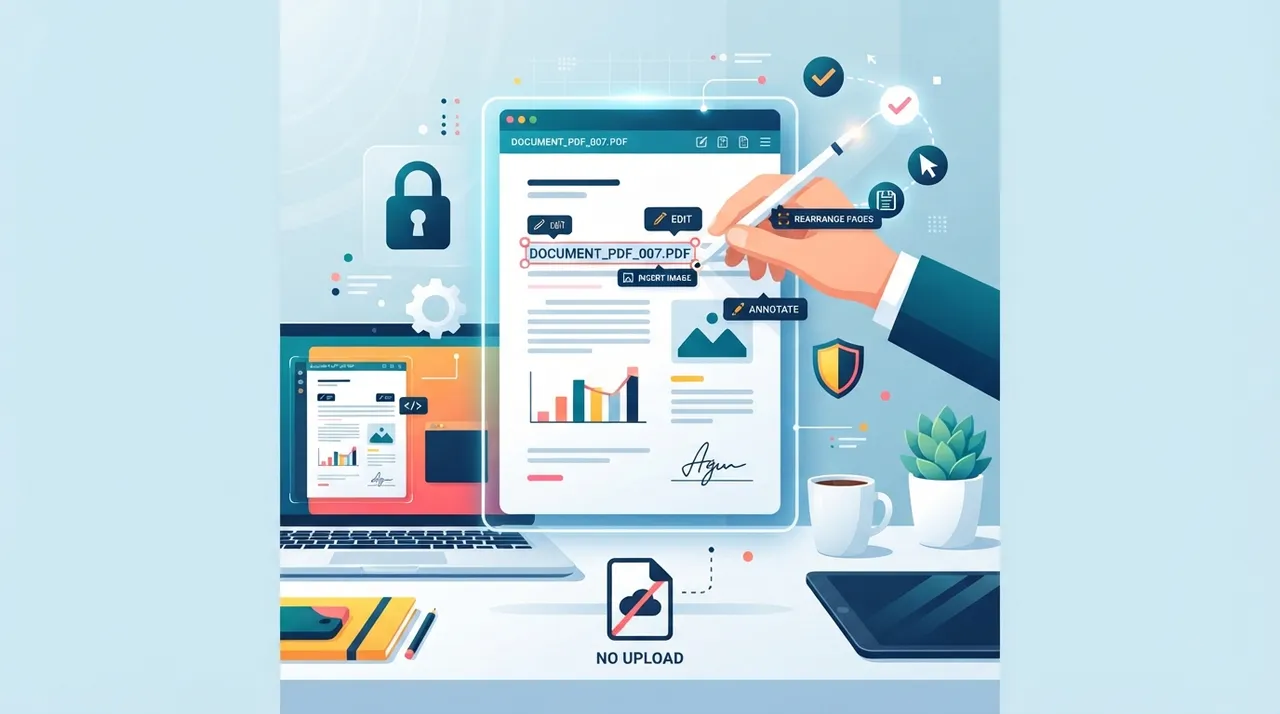
RealEditPDF is an advanced PDF document editing tool that operates entirely client-side. This means all editing processes occur within your web browser without the need to upload your files to any server. This approach relies on modern web technologies, making it an ideal solution for individuals and businesses that prioritize data security and privacy. RealEditPDF offers a wide range of editing features typically found in paid desktop software, but provides them through an easy-to-use web interface.
The tool includes capabilities for editing text and images, adding electronic signatures, merging and splitting files, reordering pages, and adding annotations. Due to its server-less nature, RealEditPDF avoids the security risks associated with storing data on third-party servers, and provides a fast and reliable user experience, as there are no waiting times for uploading or downloading files after processing.
Why it helps
- Unmatched Security and Privacy: Since editing is done entirely within the browser, your sensitive documents are never uploaded to any server, ensuring your data remains completely private and secure. This is crucial for lawyers, accountants, and anyone handling confidential information.
- High Speed and Efficiency: The waiting time associated with uploading and downloading files is eliminated, providing an instant and seamless editing experience. You can start editing immediately upon opening the file, and changes appear in real-time.
- Comprehensive Set of Editing Tools: RealEditPDF offers advanced editing capabilities including text modification, image addition, shape insertion, electronic document signing, merging multiple PDF files, splitting large files, and reordering pages.
- Flexible Use from Anywhere: Since it operates in the browser, it can be accessed from any internet-connected device, whether it's a desktop computer, laptop, or even a tablet, without the need to install any software.
- Cost Savings: It eliminates the need to purchase expensive PDF editing software, offering a powerful and free or much more cost-effective alternative for advanced features.
How to get value
- For Graphic Designers and Freelance Creatives: Designers can use RealEditPDF to make final text adjustments in brochures or marketing documents created in PDF format, without having to revert to the original design software (like InDesign or Illustrator) for minor changes. This saves time and reduces workload, especially when dealing with frequent client revisions to text content or adding quick notes. For example, if a client requests a date change in a PDF poster, the designer can make the edit directly in RealEditPDF and quickly send the final version.
- For E-commerce Entrepreneurs: Entrepreneurs can use the tool to quickly update product catalogs in PDF format, add new promotional offers, or adjust prices without needing to completely redesign the catalog. They can also merge multiple invoices or receipts into a single PDF file to send to customers, or add electronic signatures to contracts with suppliers or business partners, accelerating administrative processes and increasing efficiency.
- For Consulting and Training Service Providers: Consultants and trainers can modify their PDF training materials or presentations to add personalized notes for each client or training session. They can also merge different reports into one document, add their digital signatures, or highlight specific sections using annotation tools, making the materials more interactive, professional, and increasing the value of the service provided.
Smart Usage Tip:
To get the most out of RealEditPDF, use it as a final editing layer for your important documents. Instead of modifying original documents designed in other software (like Word or PowerPoint) for every minor change, convert them to PDF and then use RealEditPDF for on-the-fly adjustments, adding signatures, or merging files. This approach ensures the original formatting of documents is preserved and acts as a safety barrier against unintentional changes in source files, saving you time and reducing potential errors. You can also use it to quickly create fillable PDF templates, making it easier to gather information from clients or colleagues.






Comments 0
No comments yet — be the first to share your thoughts.
Share your thoughts
To comment, sign in first — we email you a one-time code (no password). This keeps the discussion clean.
Sign in to comment →