
What is SandBox (Isolating NPM Package Installs)?
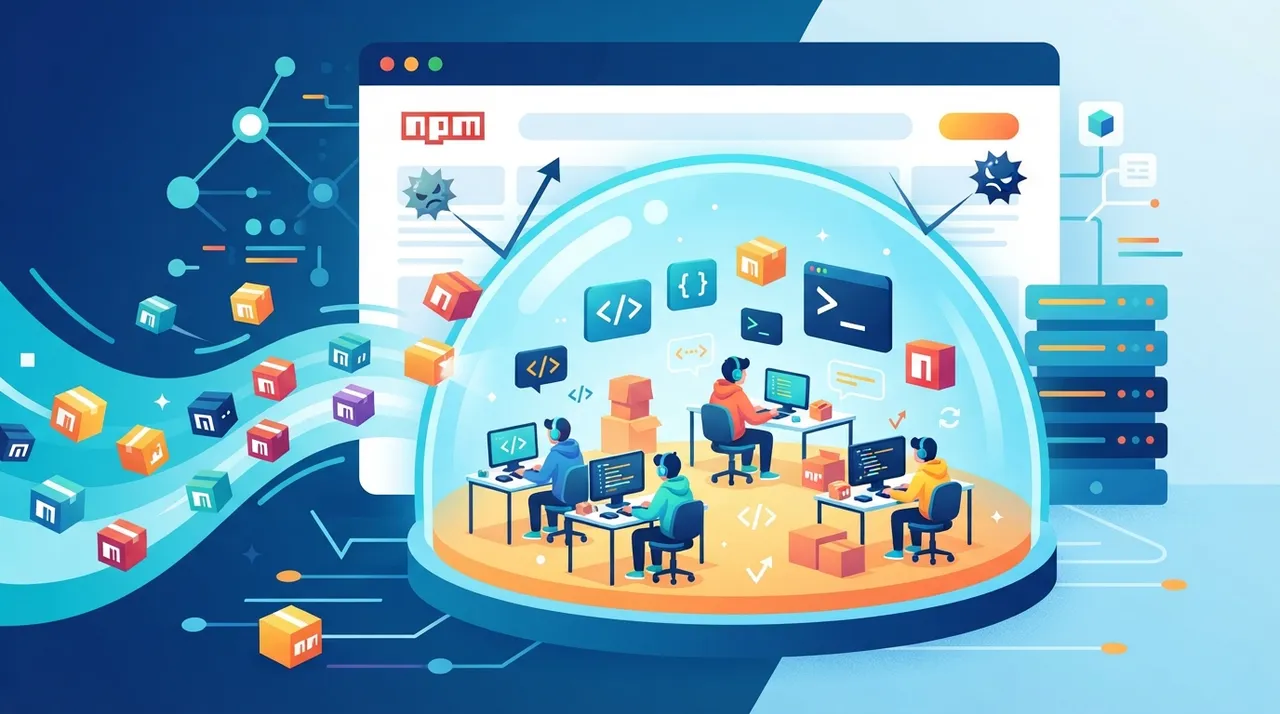
SandBox is a technique or concept that allows developers to isolate the installation step of any NPM (Node.js Package Manager) package within a secure, restricted environment. In the context of web development and Node.js applications, NPM packages are an integral part of almost every project, providing ready-made functionalities and accelerating the development process. However, installing packages comes with potential security risks, especially when dealing with packages from untrusted sources or those that might contain malicious code or perform unwanted changes to your system.
In essence, "Sandbox the install step" works by creating a temporary virtual container or isolated environment for each package installation. This container prevents the package from directly accessing the main file system, network, or other sensitive system resources in an unauthorized manner. Any actions performed by the package within this sandbox are monitored, and if it attempts to do anything outside the specified permissions, it will be blocked. Once the installation is complete, the isolated environment is deleted, leaving your system clean and secure from any potential side effects.
This technique is typically implemented using tools like Docker, lightweight virtual environments, or even internal mechanisms within some advanced package managers that offer built-in isolation features. The ultimate goal is to provide an additional layer of security for developers, enabling them to experiment with new packages or work on open-source projects without worrying about potential security threats that might arise from the installation process itself.
Why it helps
- Enhanced Security Against Malicious Code: Sandboxing prevents NPM packages from executing malicious code that might attempt to access your file system, steal sensitive data, or alter system settings during the installation process. This significantly reduces the risk of supply chain attacks targeting open-source packages.
- Protecting the Development Environment from Unstable Dependencies: Sometimes, packages may contain scripts that execute during installation and could lead to unexpected results or conflicts with other tools in your development environment. The sandbox provides protection against these unstable dependencies, maintaining the stability of your workflow.
- Flexibility in Experimenting with New Packages: Developers can try out new or unknown NPM packages with greater confidence, knowing that any undesirable behavior will be isolated and will not affect their host system. This encourages innovation and exploration of new tools without concern.
- Reducing Installation Clutter: Once the installation within the sandbox is complete, the isolated environment is deleted. This ensures that no temporary files or unnecessary settings are left behind on your system, maintaining a clean workspace and reducing clutter.
- Supporting Compliance and Security Audits: In corporate environments or projects requiring strict security standards, installation isolation helps meet compliance requirements by providing proof that installed packages have undergone a secure and monitored installation process.
How to get value as a freelancer/entrepreneur to boost productivity or income
- Safely Accelerate Experimentation with New Technologies: As a freelancer or entrepreneur, you often need to experiment with new libraries and frameworks to deliver cutting-edge solutions for your clients or innovate your products. Imagine you're working on a new project that requires integrating an NPM package you haven't used before. Instead of risking direct installation on your main system – which could lead to conflicts or security issues that halt your workflow and cost valuable time – you can use SandBox to isolate the installation process. This allows you to quickly and securely evaluate the package, ensuring it doesn't contain vulnerabilities or malicious code. If the package is safe and effective, you can integrate it with confidence. If it causes problems, these issues will be confined to the sandbox and won't affect your productivity, saving you hours of troubleshooting and increasing your efficiency in project delivery.
Smart use tip
Use a tool like npm-sandbox (if available or similar) or create a dedicated Docker environment to install and test suspicious packages. You can write a simple script that creates a Docker container, runs the npm install command inside it, and then deletes the container after inspecting the outputs. This ensures your main system remains clean and secure, allowing you to focus on development without worrying about potential security threats from third-party packages. You can also integrate this into your CI/CD pipeline to automatically scan packages before integrating them into your project.


Comments 0
No comments yet — be the first to share your thoughts.
Share your thoughts
To comment, sign in first — we email you a one-time code (no password). This keeps the discussion clean.
Sign in to comment →