

What it is
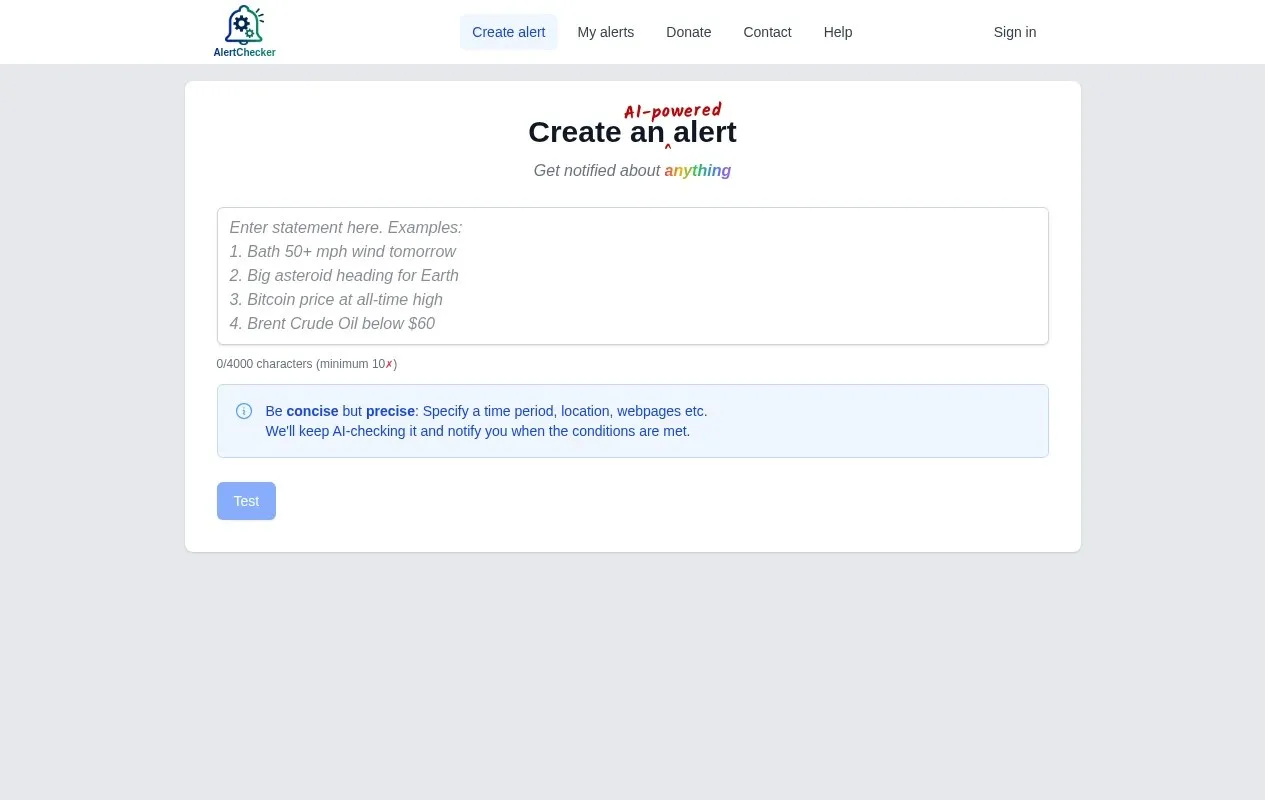
AlertChecker is an intelligent tool that enables you to monitor any publicly available data on the internet and receive instant email alerts when a specific condition you define is met. AlertChecker stands out due to its intuitive interface, which allows users to write conditions in plain English, eliminating the need for complex programming knowledge. Instead of setting up intricate scripts or spreadsheets, you can simply tell AlertChecker what you want to monitor, such as: “Email me if the temperature in Dubai rises above 45 degrees Celsius,” or “Notify me if the phrase 'population growth' appears on a specific news page.” The tool then periodically checks the specified sources and sends you an alert as soon as the condition is met.
This tool is an effective solution for professionals, business owners, and individuals who need to stay informed about specific changes without spending time on manual monitoring. It serves as a bridge connecting available web data with daily decision-making needs, ensuring vital information reaches you automatically and in a timely manner.
Why it helps
- Custom alerts in natural language: AlertChecker allows you to formulate alert conditions using simple, direct English, such as “If XYZ stock price drops below $50” or “If a new job posting with 'digital marketer' description appears.” This eliminates any need for programming or complex regular expressions.
- Continuous and accurate monitoring: The tool periodically checks specified sources (which can be every few minutes, or daily, as needed), ensuring you won't miss any important event. This continuous monitoring guarantees real-time or near real-time alerts, providing you with a competitive advantage.
- Diverse data sources: AlertChecker is not limited to one type of data. It can monitor web page content, product prices, weather data, match results, document changes, or even social media updates, as long as the data is publicly available online.
- Time and effort saving: Instead of constantly manually browsing websites or searching for information, AlertChecker does the job for you. This saves countless hours of routine work, allowing you to focus on more critical tasks.
- Flexible integration: AlertChecker can be linked to many other applications via APIs or webhooks, allowing you to trigger automated actions upon receiving an alert. For instance, an alert can lead to updating a database or sending a message to a Slack channel.
How to get value
- To monitor job or project opportunities: If you are a freelancer or entrepreneur seeking new job or project opportunities, you can set up alerts to monitor job boards or freelance platforms. For example, you can configure AlertChecker to email you as soon as the phrase “logo design project” or “web developer wanted” appears on platforms like Upwork or Fiverr. This allows you to apply early for relevant opportunities, increasing your chances of securing the project before competitors.
- To monitor competitor or product prices: Business owners can monitor competitor product prices or changes in raw material costs. Setting up an alert like “If product X's price on website Y drops below $100” will enable you to quickly adjust your pricing strategy or make smart purchasing decisions, maintaining your competitiveness and increasing profit margins.
- To monitor industry news and potential clients: An entrepreneur can set up alerts to monitor news related to their industry or companies they target as potential clients. For example, “Send an alert if 'my competitor's company name' is mentioned in economic news.” This helps you stay informed about competitors' strategic moves or identify potential clients undergoing changes that might require your services.
- To monitor changes in important reports or documents: If you rely on public reports or documents that change periodically (such as market reports, specific regulation updates), you can set up AlertChecker to inform you of any changes in their content. For example, “If content changes in the third paragraph of the 'New Regulatory Guidelines' page.” This ensures you are always aware of the latest information without the need for frequent manual review.
Smart usage tip:
To boost productivity and income as a freelancer, don't just monitor general keywords. Use AlertChecker to monitor **negative reviews of competitors** on review platforms. When you receive an alert about a negative review for a competitor offering a similar service, this is a golden opportunity to reach out to the frustrated client (if their information is available) and offer your service as a better alternative. You can phrase the alert as: “If a rating less than 3 stars appears on 'Competitor Service Name' page on site Y.” This proactive approach not only opens doors to new clients but also gives you a competitive edge based on your understanding of market needs and competitor weaknesses.






Comments 0
No comments yet — be the first to share your thoughts.
Share your thoughts
To comment, sign in first — we email you a one-time code (no password). This keeps the discussion clean.
Sign in to comment →