
What it is
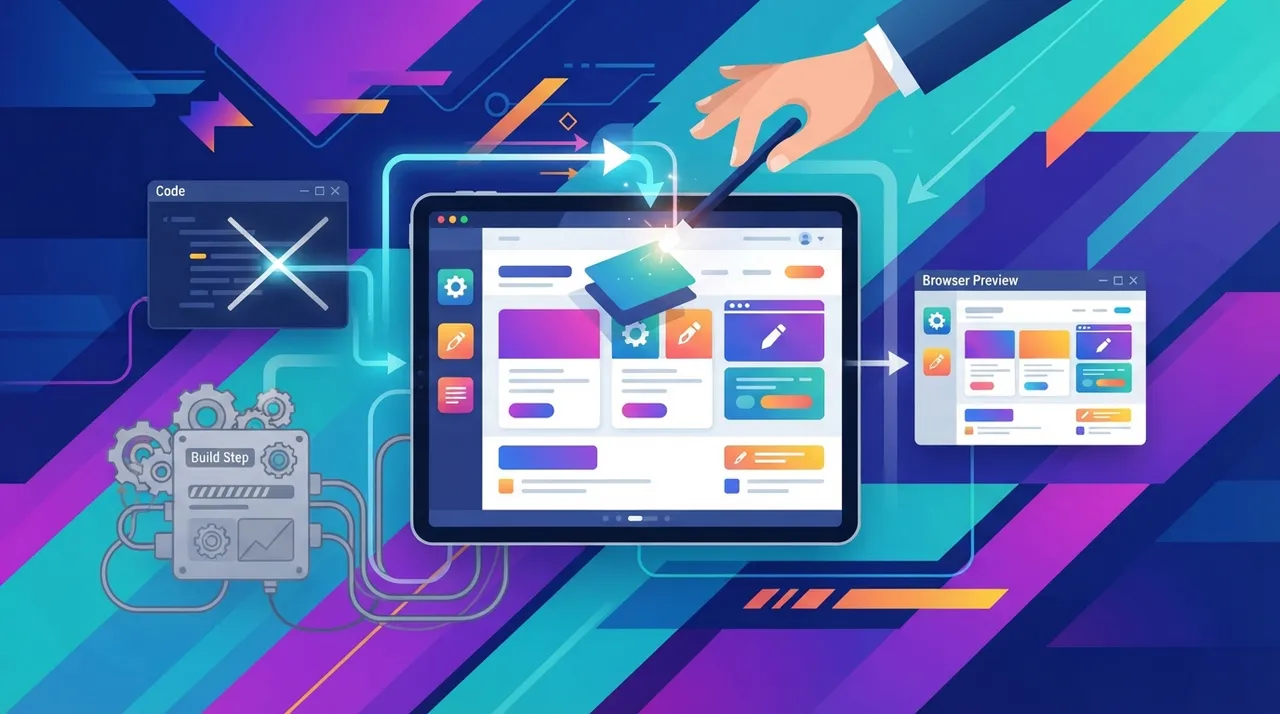
«Preview and edit Material Kit React» is an advanced tool that enables developers and designers to interact with and modify Material Kit React components (based on Material-UI) in real-time without the need to run a full project build process. Traditionally, modifying front-end components in React projects, especially those relying on frameworks like MUI, requires rebuilding the project to see changes. This process can be time-consuming and hinder the creative workflow. This tool aims to streamline this process by providing an immediate interactive environment where changes to components can be previewed, properties adjusted, different styles experimented with, and even the component's code directly modified, with results seen instantaneously. Such tools often rely on technologies like Hot Module Replacement (HMR) or in-browser code editing mechanisms that allow partial loading of changes without a full page reload or project rebuild, offering a seamless and efficient development experience.
Why it helps
- **Accelerated Development Cycle:** By eliminating the need for a traditional build step to see changes, developers can experiment with and modify components much faster. This reduces the time spent between iterations and boosts the overall development speed of the project.
- **Improved Designer-Developer Collaboration:** This tool provides a shared visual environment where designers and developers can interact with the front end. Designers can suggest modifications and experiment with different design options directly, while developers instantly see the impact of these changes, facilitating communication and reducing misunderstandings.
- **Enhanced User Experience (UX) and User Interface (UI) Design:** The ability to instantly experiment with colors, fonts, layouts, and component behavior encourages more experimentation and refinement. This leads to more polished user interfaces and a better user experience, as issues can be discovered and addressed early in the design cycle.
- **Effective Testing and Presentation Environment:** The tool can be used to test component behavior in various scenarios or to present quick prototypes to clients or stakeholders. This interactive environment makes it easy to demonstrate component capabilities and gather feedback in early stages.
- **Flexibility in Customization:** The tool allows users to modify component properties (props), change themes, and even directly adjust custom CSS for each component. This flexibility enables the creation of unique and personalized design experiences that precisely match project requirements.
How to get value
As a freelance front-end developer or an entrepreneur managing a web design and development agency, this tool can make a significant difference in your productivity and income. Imagine you're working on a client project requiring a modern admin dashboard using Material Kit React. Instead of setting up a local development environment, running the server, and rebuilding the project after every minor change in colors, layout, or text, you can use this tool.
1. **Accelerate Prototype Delivery:** At the project's outset, you can quickly create prototypes and present them to the client in a live online session. During the session, if the client requests a button color change or an element alignment adjustment, you can make the modification instantly before their eyes and see the effect immediately. This not only saves your time on adjustments but builds client confidence in your responsiveness and flexibility. This increases the likelihood of the client being impressed with your work and saves time that would otherwise be lost in email exchanges and multiple review cycles.
2. **Improve Project Time Management:** Time is money, especially for a freelancer. By reducing the time spent on the build and iteration process, you can accomplish more tasks in less time. This means you can take on more projects or complete current projects faster, increasing your overall revenue. You can also use the extra time to refine your skills or market your services.
3. **Streamline Review and Feedback Process:** Instead of sending screenshots or videos to the client, you can invite them to view the working interface directly through the tool (if it supports link sharing or remote access). They can navigate the interface and clearly identify desired changes, reducing misunderstandings and accelerating the feedback process, thereby reducing the number of iterations required to reach an accepted final design.
Smart usage tip
Leverage this tool to create your own “live component library.” Instead of just previewing Material Kit React components, you can save common configurations and modifications you make to components (e.g., buttons with specific colors or cards with particular layouts) as “custom templates.” When starting a new project, you can quickly recall and apply these templates, significantly cutting down setup time and ensuring design consistency across your various projects. This approach not only saves time but also enhances the quality and efficiency of your work.






Comments 0
No comments yet — be the first to share your thoughts.
Share your thoughts
To comment, sign in first — we email you a one-time code (no password). This keeps the discussion clean.
Sign in to comment →