
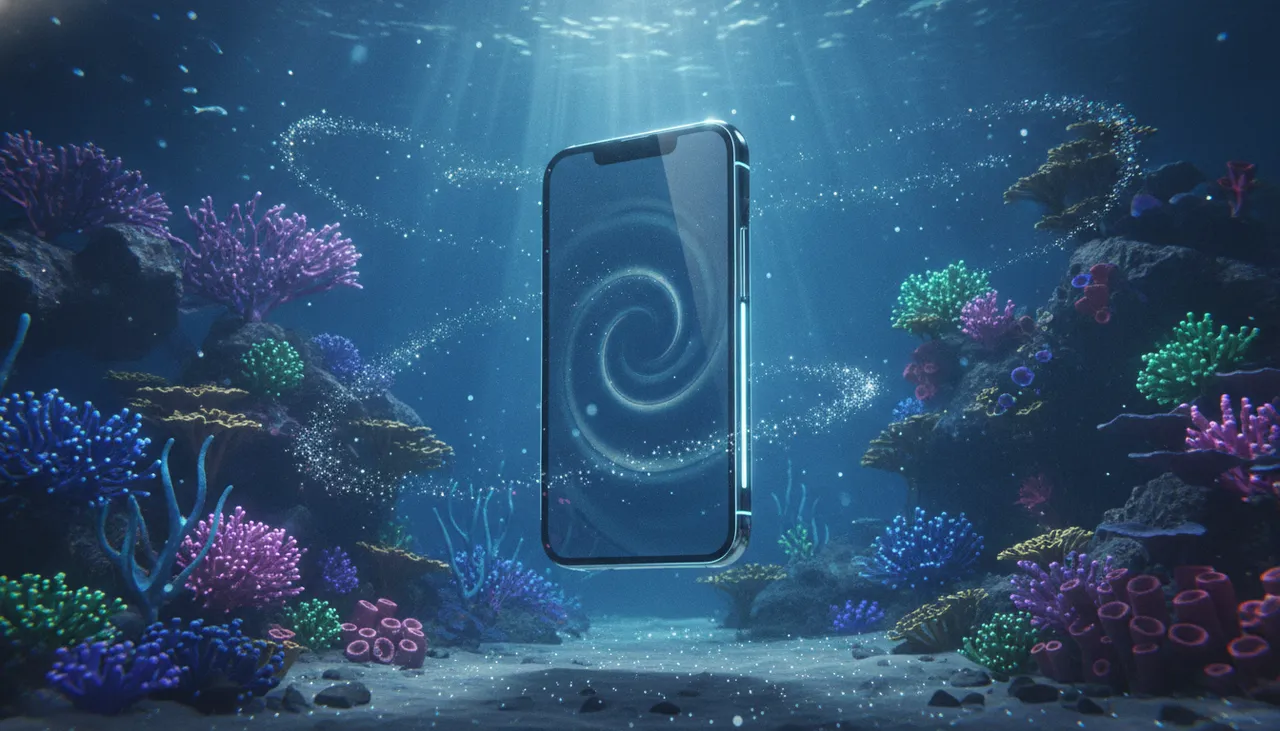
The idea
The core of this trend revolves around seamlessly integrating your real product photos into specially designed virtual worlds, leveraging Augmented Reality (AR) technologies. Instead of merely displaying ordinary product images, it presents them as an integral part of an imaginative or artistic scene, adding unique visual depth and appeal. This approach allows consumers to visualize the product in unconventional contexts, stimulating curiosity and engagement more effectively.
The popularity of this idea stems from its ability to break traditional visual marketing barriers. In an era where visual content is increasingly diverse and high-quality, simply showcasing the product itself is no longer sufficient. Audiences demand an experience, a visual story that evokes emotions and creates a connection. Utilizing AR in virtual worlds gives the product a magical dimension, as if it emerged from a fairy tale or a movie, making it unforgettable and increasing its chances of going viral on social media platforms.
How to apply it
- Select the Product and Virtual Scene: Choose the product you wish to showcase and define the nature of the virtual world you want to integrate it into. Is it a futuristic scene? A magical forest? An underwater city? The scene should align with the product's identity and message.
- Prepare Product Images: Capture high-quality photos of the product from multiple angles, preferably against a neutral background (like a green screen) to facilitate easier integration later.
- Use AR Design Tools: Several software and tools assist in creating AR scenes, such as Adobe Aero or Spark AR. These tools allow you to import 3D models of the product or flat images and integrate them into virtual environments. You can also leverage virtual world design platforms like Unity or Unreal Engine for more complex scene creation.
- Design the Virtual Scene: Build the virtual world where the product will be displayed. Add details, lighting, textures, and other elements that make the scene look realistic and engaging. Ensure there is clear space to place the product within the scene.
- Integrate the Product into the Scene: Place your product images or models within the virtual scene. Adjust the size, rotation, and lighting to match the scene's environment. The product should appear as an authentic part of this world.
- Add Finishing Touches: Make color adjustments, shadows, and visual effects to enhance realism and appeal. You can add subtle movements to the product or scene elements for more dynamism.
- Export and Share: Export the final video or image in high quality. Share it on social media platforms and your website, using relevant hashtags related to augmented reality, 3D design, and creative product display.
Prompt to recreate the image
To generate a similar image yourself, use this prompt in your favorite image generator:
A futuristic glowing smartphone, sleek and minimalist design, floating gracefully within an ethereal bioluminescent deep-sea coral reef environment. The coral glows with soft, vibrant blues, purples, and greens, casting gentle reflections on the phone's polished surface. Small, luminous fish swim around, adding to the surreal atmosphere. The water is clear and slightly shimmering, with subtle light rays filtering from an unseen source above. Hyperrealistic, cinematic lighting, 8K resolution, ultra-detailed, volumetric light, depth of field.




Comments 0
No comments yet — be the first to share your thoughts.
Share your thoughts
To comment, sign in first — we email you a one-time code (no password). This keeps the discussion clean.
Sign in to comment →