
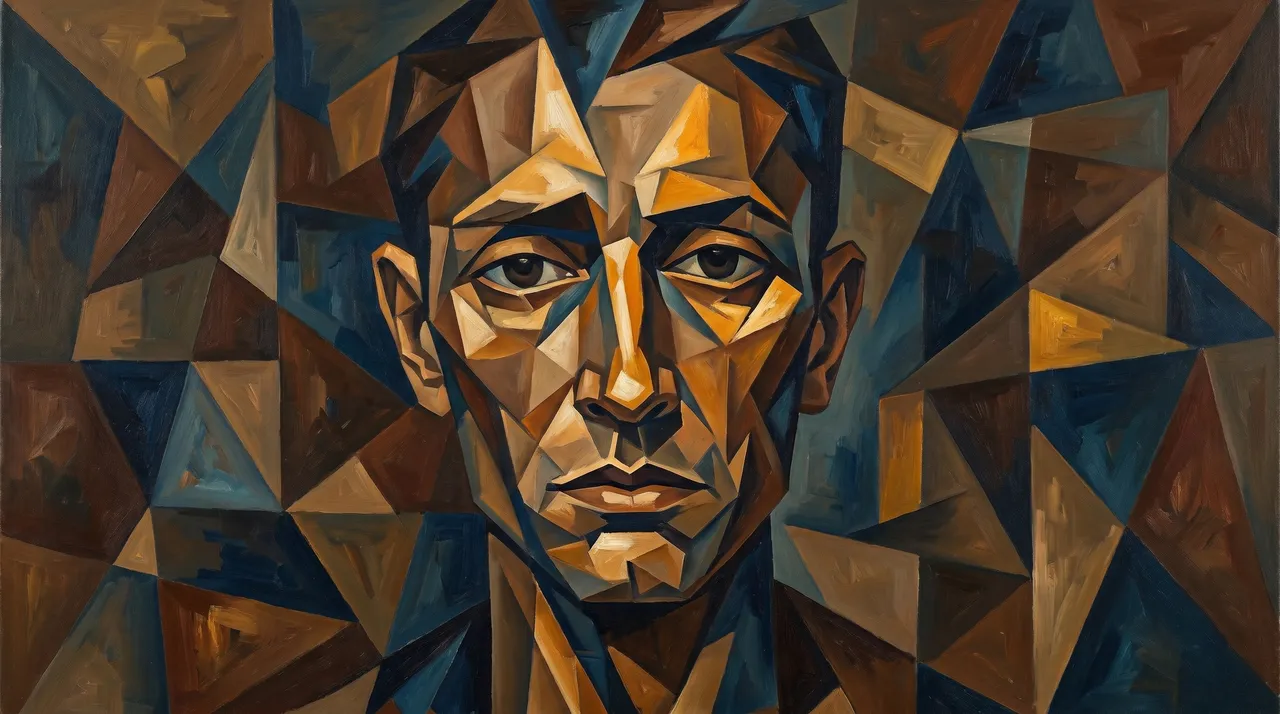
The idea
Cubism is a revolutionary art movement that emerged in the early 20th century, characterized by depicting objects from multiple viewpoints simultaneously, breaking them down into geometric shapes. This trend offers a unique opportunity to transform your personal photos or any image into an artwork mimicking the famous Cubist style, adding depth and aesthetic individuality. This style is gaining increasing popularity because it combines modernity with a classic artistic touch, making it ideal for sharing on social media or as distinctive backgrounds.
How to apply it
- Choose your image: Start by selecting a clear, high-quality image of a person, a landscape, or any element you wish to transform. Images with good detail tend to work best.
- Use an AI tool: Input your chosen image into a dedicated image generation tool (such as Midjourney, DALL-E 3, or Stable Diffusion).
- Add the prompt: Copy and paste the provided English prompt (or modify it to suit your vision) into the text field of the software. The prompt is designed to guide the AI in creating the desired Cubist effect.
- Refine and enhance: After generating the image, you may need to make minor adjustments to the prompt or use the editing options available in the tool to achieve the perfect result. Experiment with changing colors, the intensity of geometric fracturing, or adding other elements.
- Share your masterpiece: Once you are satisfied with the result, share your Cubist artwork on your social platforms or use it as a unique background.
Prompt to recreate the image
To generate a similar image yourself, use this prompt in your favorite image generator:
Transform this image into a Cubist painting. The subject should be rendered with multiple, overlapping geometric planes, sharp angles, and fractured perspectives, characteristic of Picasso and Braque. Use a palette of muted earthy tones with occasional bold contrasts. The composition should convey dynamism and a sense of deconstruction. Emphasize the abstract yet recognizable form of the original subject.







Comments 0
No comments yet — be the first to share your thoughts.
Share your thoughts
To comment, sign in first — we email you a one-time code (no password). This keeps the discussion clean.
Sign in to comment →